
Video and photo
How to choose the format, record, take RAW photos and name your files with the slate.
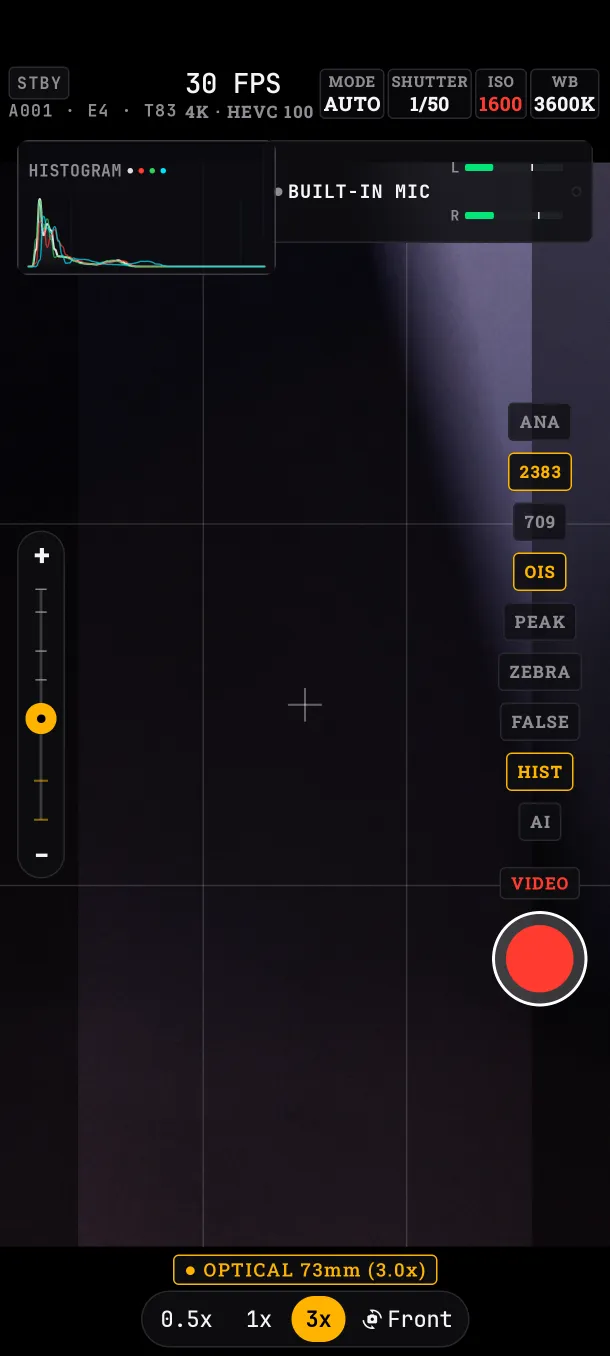
Format and frame rate
Tap the FPS in the HUD. There you choose the resolution (4K or 1080p), the codec (HEVC or H.264; HEVC takes less space at the same quality), the bitrate (100 or 60 Mbps) and the frame rate.
The app only offers what your phone really records, with the active lens. On the Edge 50 Pro: 4K up to 30 fps; 1080p up to 60 with the main and tele lenses, and up to 30 with the ultra-wide. If a value is not available, the app moves to the closest one and restores yours on a lens that allows it. The format cannot be changed while recording.
Recording
Choose VIDEO on the pill above the red button and tap it. While recording, the button turns square and the screen border turns red. The volume keys, the camera key, a headset button and the gimbal button also record.
- Recording starts once the image is stable, so the first frames are not lost.
- If the app goes to the background, recording stops and the file is saved.
- If a frame is dropped, the HUD tells you live.
RAW photo
Choose PHOTO. Each shot saves a DNG, the open RAW format read by Lightroom, Capture One and other editors, at the sensor's full resolution. In AUTO, the shutter stays above a limit meant for handheld shooting.
Slate and file names
Tap the slate in the HUD (for example A001 · E3 · T02). Fill in PROJECT, ROLL, SCENE and TAKE. The take goes up by itself after each recording and resets to 1 when the scene changes.
- Video:
PROJECT_ROLL_E3_T02_date_time.mp4 - Photo:
PROJECT_date_time.dng
The slate cannot be edited while recording.
What if…
- …recording does not start:
Recording could not start. Nothing was saved.appears, no file is left and the take does not advance. - …I tap REC twice very fast: the app ignores the second tap while it starts.