
The screen
Where everything is, what the gestures on the image do, and how to switch lenses.
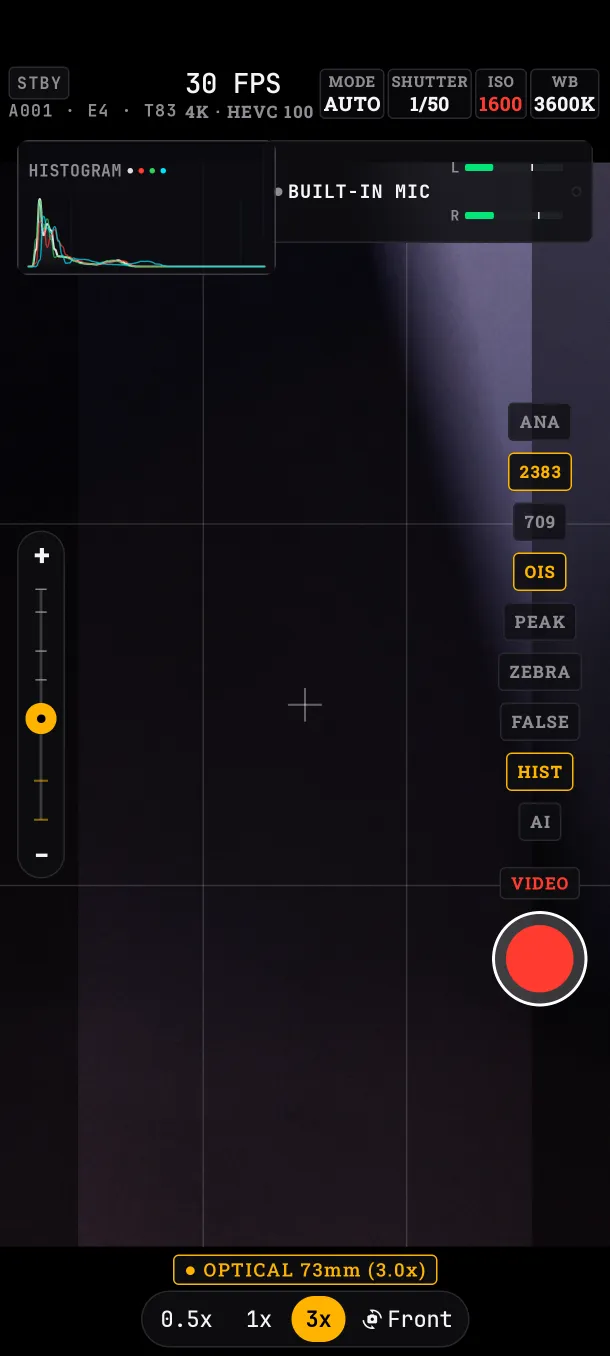
The areas
- Top (HUD): recording status, the slate, the gimbal battery, frame rate and format, and the exposure, white balance and focus values. Tapping a value opens its panel.
- Below the HUD: the histogram and the audio meters.
- Left: the zoom bar.
- Right: the tools column (anamorphic, LUT, profile, stabilization, peaking, zebras, false color, histogram, AI), the VIDEO / PHOTO selector and the REC button.
- Bottom: the lens buttons and the dial of the open panel. Only one panel is open at a time; tapping its value again closes it.
Portrait and landscape change the layout, but the controls are the same.
Gestures on the image
- One tap: focuses on that point. If metering is on SPOT or the EV panel is open, it also meters exposure there.
- Double tap: monitor mode. Leaves only the image, REC, the histogram and audio. Another double tap returns.
- Pinch: zoom.
Taps on the black bars do nothing: they are outside the image.
Lenses
The buttons at the bottom show only the lenses your phone lets other apps use. On the Edge 50 Pro: 0.5x (ultra-wide), 1x (main), 3x (tele) and Front. On a phone with a single rear lens, only Front appears.
Coming back from the front camera, the app always goes to 1x.
Zoom
With a pinch, the bar on the left or the gimbal wheel. On phones with several rear lenses, the phone itself switches lens as you pass 0.5x, 1x or 3x.
While recording, the zoom stays within the lens you started with: it never switches lens mid-take, because that jump would drop frames. On the Edge 50 Pro, recording from 1x the zoom stops at 2.95x. In video the zoom goes up to 19.5x.
What if…
- …I double tap: the first tap also focuses.
- …I don't see a lens my phone has: some makers don't let other apps use every lens. The app shows only the ones it can open.