
Monitoring aids
Tools that show you focus, exposure and framing while you shoot. None of them end up in the file.
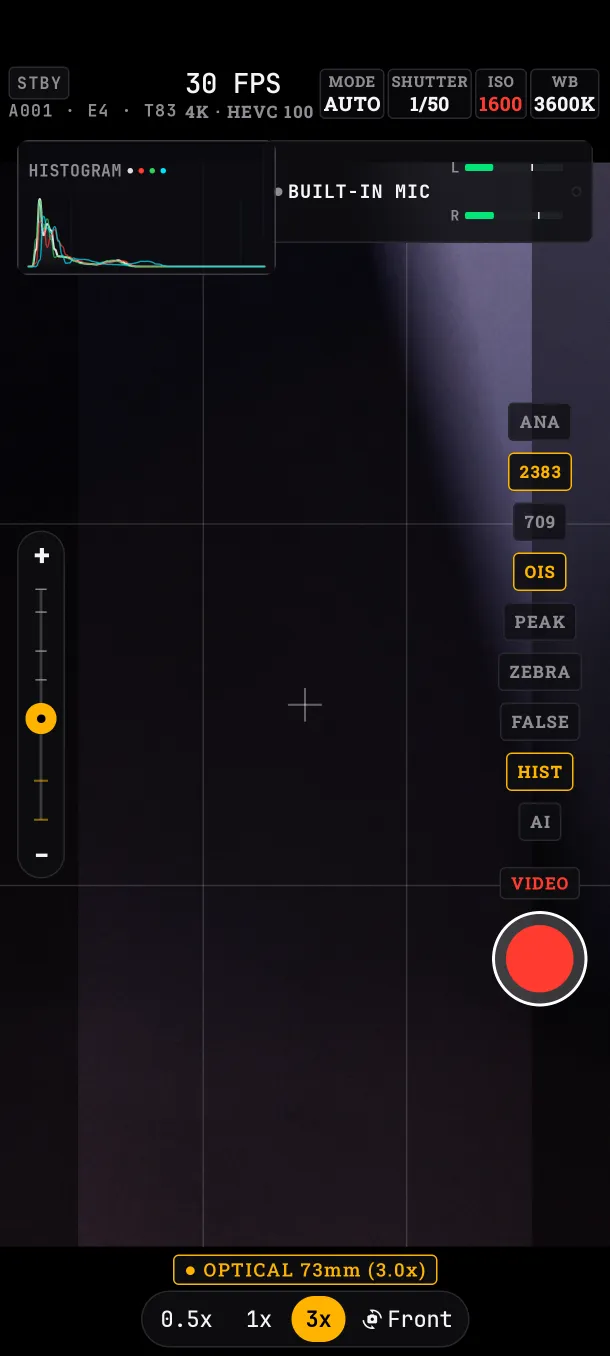
The tools column
On the right (at the top in landscape). Each button turns amber when it is on.
PEAK: focus peaking
Marks in-focus edges in green.
ZEBRA: zebras
Stripes over areas brighter than 95 %, about to clip.
FALSE: false color
Paints the image by brightness level, with a legend: CLIP (above 96 %, blown out), HOT (90 %), SKIN (65 %, well exposed skin), GREY (18 %, middle grey), SHADOW and CRUSH (below 9 %, black with no detail).
HIST: histogram
Shows how brightness is spread, in luma and RGB, with CRUSH and CLIP warnings. Tapping the histogram also hides it.
ANA: anamorphic
For anamorphic lenses, which squeeze the image horizontally. De-squeezes the viewfinder at 1.33x, 1.55x, 1.75x or 2.0x. The file stays squeezed, as it comes from the lens, so you stretch it in editing.
OIS / EIS / OFF: stabilization
OIS is optical stabilization (the lens moves); EIS is electronic (it crops and compensates the image). The button only cycles through the modes the active lens has. If you choose OIS and switch to a lens without it, the button shows OFF; back on a lens with OIS, your choice returns.
AI: the AI switch
Turns on the AI features, today face tracking for focus. It runs on the phone and starts off every time you open the app.
What if…
- …I leave zebras or false color on while recording: they don't end up in the file; they are viewfinder only.
- …I use a lens without stabilization: the button stays on OFF.